
Screen recorder for macOS
Record. Cut. Done.
Pixelreel is a screen recorder for the menu bar. Record the full screen, an area, or one window to MP4, with your microphone, system audio, and your camera in a bubble. Then cut it in the built-in editor and export MP4 or GIF.
Free, Supporter licence for €12 · macOS 26+, Apple Silicon
What it's about
A short recording often explains more than a long text: how a bug happens, where a setting lives, what a flow looks like. Pixelreel lives in the menu bar and is ready in one click or with your own shortcut.
Pick the full screen, an area, or a single window, record your microphone and system audio, and show your camera in a round bubble if you like. A countdown gives you three seconds, and the control at the top of the screen pauses and stops while staying out of the recording itself.
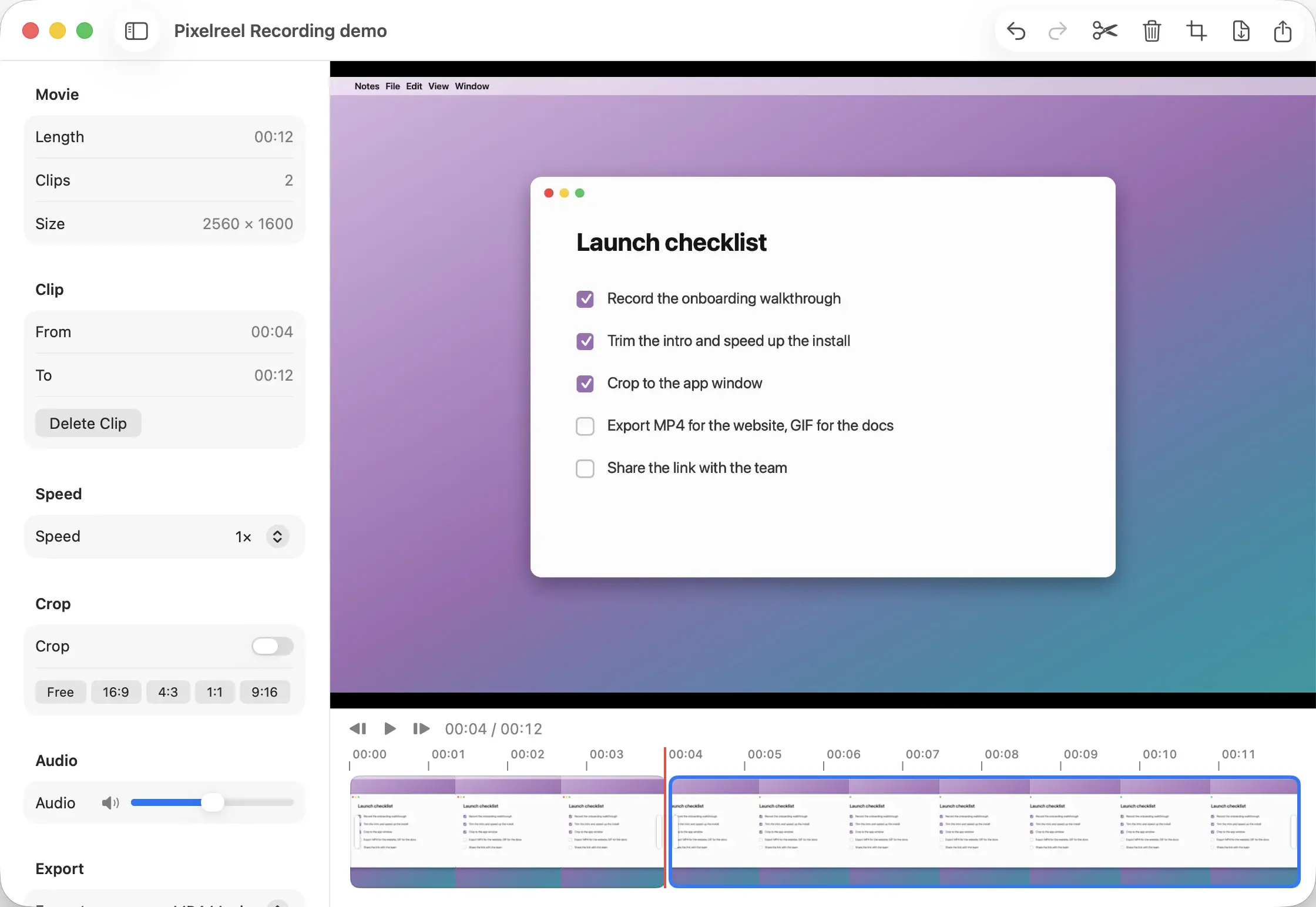
When you stop, the MP4 is on your Desktop, and a small card offers Copy, Share, and Edit. In the editor you cut, trim, speed up, crop, and set the volume. Export as MP4 or GIF. Everything happens on your Mac, and there is no account.
How it works
Record
Pick the screen, an area, or a window from the menu bar or with a shortcut, plus microphone, system audio, and camera.
Edit
Cut, trim, change speed, crop, and set the volume in the editor.
Share
Export MP4 or GIF, copy it, drag it out, or share it with AirDrop, Mail, and Messages.
What Pixelreel can do
Screen, area, window
Record the full screen, an area you drag out, or a single window to MP4 at full Retina resolution.
Microphone and system audio
Your voice and your Mac's sound in the same recording. Pixelreel's own sounds stay out.
Webcam bubble
Your camera in a round, mirrored bubble. Move it, resize it, or hide it.
Pause and countdown
Pause and resume and still get one movie. A three-second countdown; Esc cancels.
Your own shortcuts
Put Record Screen, Area, Window, and Stop on the keys you like.
Editor
Cut, trim, speed from 0.5× to 4×, crop with fixed aspect ratios, and volume per track. With undo.
MP4 and GIF
Export MP4, or a GIF for tickets, chats, and docs.
Copy and share
Copy the file, drag it out, or pass it on through the macOS share menu.
Built for Apple silicon
Native on Macs with M chips. Updates come signed, straight from pixelandprocess.de.
Privacy and security
- Recordings
- stay on your Mac
- Account
- none needed
- Permissions
- Screen Recording, plus microphone and camera only when you use them
- Updates
- signed and notarized, from pixelandprocess.de
- System
- Apple silicon, macOS 26 or later
Download Pixelreel
macOS
Apple Silicon
Version 1.0.0 · 29 Oct 2026 · 3.8 MB
macOS 26.0 or later
DownloadWhat's new
The first release of Pixelreel, the screen recorder from Pixel & Process.
- Record the full screen, an area, or one window to MP4 from the menu bar or your own shortcuts.
- Microphone, system audio, and a round camera bubble you can move and resize.
- Pause and resume
Pricing
Prices include VAT where it applies. Payment via Stripe. Pixelreel is free. The Supporter licence supports its development.
Supporter
€12.00
one-off
- Use it on 3 Macs
- All future updates
- Yours to keep, the licence does not expire
- Licence key by email, managed in your account
Coupon code
Who Pixelreel is for
Show a bug instead of describing it: record, trim, drop it into the ticket.
Demo a feature in a minute, with your voice and your face in the corner.
Short how-tos and GIFs for docs, support, and release notes.
Frequently asked questions
What does Pixelreel cost?
Nothing. Pixelreel is free. If you want to support its development, buy the Supporter licence for €12.
Which Macs does Pixelreel run on?
Macs with Apple silicon (M1 and later) on macOS 26 or later. There is no version for Intel Macs.
Are my recordings uploaded?
No. Recordings stay on your Mac, on the Desktop by default. Pixelreel has no account and no cloud.
Which permissions does Pixelreel need?
Screen Recording for every recording. Pixelreel asks for the microphone and camera only when you turn them on.
How do I get updates?
Pixelreel can check for new versions itself and installs them after one click. Every update is signed and checked before it installs. In Settings you can also get beta versions.
More products from the studio
 ReelportReelport edits, captions and renders your talking-head videos inside DaVinci Resolve Studio and schedules them to Instagram, TikTok, YouTube and Facebook.
 TypeshelfCollect, activate, compare and share fonts. A fast font manager for the Mac, with Google Fonts, Fontshare and Font Squirrel built in.
 FormspringEvery customer touchpoint in one workspace: forms, surveys, funnels, bookings and links, with a shared inbox.
 DrohnenAtlasCan I fly here? Flight zones from official DFS data, weather, NOTAMs and a flight log in one app.
 SorrelWebsite intelligence in one Trust Score: compliance, security, vendor risk, accessibility and uptime.
 ScampilotSpot scam emails in seconds. An AI checks suspicious messages, emails and links and gives its verdict in plain language.
 BurrowA public HTTPS address for your local server, with one command. Hosted in the EU, the alternative to ngrok.
 SnareA free webhook inspector and request bin from the EU, plus over 20 small developer tools that log nothing.
 FlowwyHold fn, speak, let go. The text appears where your cursor is. Everything runs on your Mac.
 KestrelCapture, annotate, measure, copy. A fast menu bar screenshot tool with an editor and on-device text recognition.
Questions about Pixelreel?
Plans, privacy, integration or feedback: write to us, and we'll reply personally.